Effective 11/15/2021, Humanscale requires a signature upon delivery.


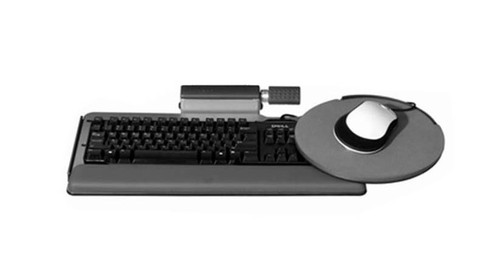
When your keyboard setup is ample, try the tray that's big enough to handle housing your keys and mouse platforms on a single surface with the Humanscale 400 Diagonal Big Keyboard Tray.
The 400 board stores everything on your work surface instead of needing a separate a mousing platform - allowing you to keep your mouse at the same tilt as your keyboard.
And not only is the tray spacious, it fits the angled edges of a diagonal corner, letting you install an ergonomic keyboard tray on trickier desk setups.
The Humanscale 400 is available with a Design Your Own option for more customized typing, your way.
Features
- Easily configured to meet your specific needs
- 400 board offers the widest single surface for a keyboard tray
- Platform is made of phenolic - an ultra-strong, remarkably thin (1/4") composite that's non-toxic, durable, and easy to clean
- Design supports multiple keyboards and mice combos and will fit most desks, including corner desks
- No need for a separate mousing platform
Specifications
| Mechanisms | 9 adjustable arms available |
| Track lengths | 11" - 27" for varying desk depths |
| Palm rests | Available in foam or gel |
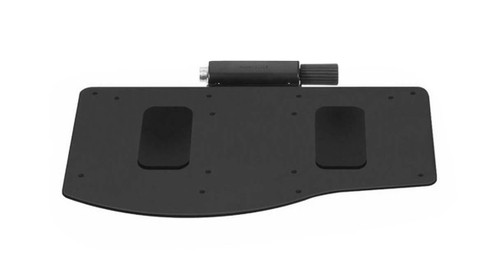
| 400 platform dimensions | 27.5" W x 11.5" D |
| Warranty | 15 years |
Color
The Humanscale 400 Diagonal Big Keyboard Tray is only available in Black.
Humanscale Keyboard Mechanisms
6G mechanism
Humanscale's newest dial-a-tilt mechanism that instantly adjusts the platform's tilt without the need to lock or loosen any knobs or levers and slimmer than the 5G. The 6G mechanism is available in black or white.
| Height adjustment | 7": 1.75" above track to 5.25" below track |
| Track length | Comes standard with 22" track |
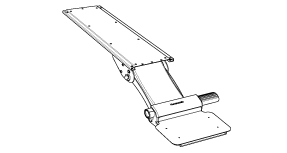
5GSM mechanism for limited-depth desks
This mechanism goes 4" farther underneath a desk surface, getting a keyboard tray stored out of the way on a shorter track, perfect for desks with limited depth or small spaces. This mechanism is available in black or platinum.
| Height adjustment | 4": 0.5" above track to 3.5" below track |
| Track length | Comes standard with 18" track |
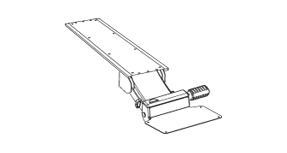
Lateral Slider
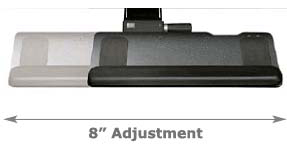
All Humanscale mechanisms pivot 360 degrees from the point where it is mounted to the track. Some users have a need for additional side-to-side adjustability. The lateral slider provides for eight extra inches of movement from right to left. This is a useful feature for someone at a large workstation that requires them to type facing different angles or monitors.
Track Length
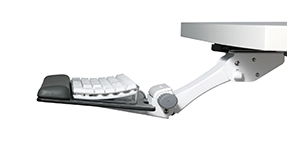
The track mounts to the underside of your work surface. It directs and supports the Humanscale mechanism and keyboard tray as it slides forward and back. Standard length on most mechanisms is 21 5/8 inches. That length ensures that the keyboard tray can be completely stowed under your desk when not in use. Some mechanisms come standard with a shorter or longer track. Consult each description for that information, but all systems can be ordered with any track length.
Palm Support
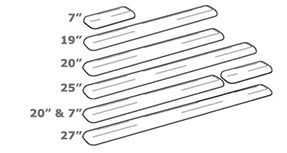
Select one of the foam or gel palm rest options for the 400 Diagonal Big keyboard platform. Choose a solid 27'' palm rest or a split palm rest with one 20'' section and one 7'' long section; this feature comes in handy if a user doesn't always want a palm rest in front of their mouse or keypad (pictured in main image above). Both types of palm supports are covered with an easy to clean, black synthetic leather.
Slim 19'' gel palm rests are also available for users with thin keyboards such as those made by Apple. The slim gel palm rests are available in silver or black, but will not sit flush against the corner of the keyboard tray like the 27'' or 20'' palm rests. The slim 19'' palm rests will sit roughly 5/8'' away from the closest corner when installed.
When designing your Humanscale 400 Diagonal Big Keyboard Tray, if you choose to not add a palm support, there will be two holes located at the installation points on the tray.
This is normal and part of the keyboard tray's design, but if you do not want a palm rest and installation holes in your tray, we suggest ordering another keyboard tray.
If you have any questions or need help choosing a keyboard tray, please don't hesitate to call us!
Mouse Platform
A separate mouse platform is not available as this keyboard tray is large enough to support mousing on the main platform.
Mouse Pad
A mouse pad for the separate mouse platform is not available as this keyboard tray is large enough to support mousing on the main platform.
Second Mouse Pad
A mouse pad for the separate mouse platform is not available as this keyboard tray is large enough to support mousing on the main platform.
Promotional Item
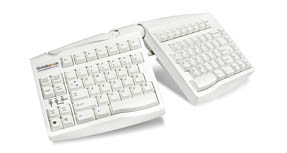
FREE Goldtouch Adjustable Keyboard GTN-0033
This keyboard's split design promotes a more natural and ergonomic typing position.
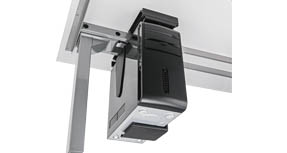
FREE UPLIFT CPU Holder
Clear up desktop space and keep your computer tower off the floor by mounting it to the underneath of your desktop. This accessory is great for height-adjustable desk users.
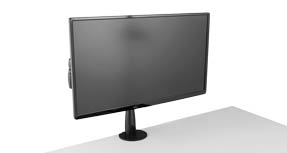
FREE UPLIFT Single Monitor Arm
Mount a monitor weighing between 4.5 lbs - 17.5 lbs, and adjust the height, depth or lateral position with easy fingertip adjustment.
2 Reviews Hide Reviews Show Reviews

-
Solid but misleading...
I bought his product because it would be installed in a corner of a L-shaped desk and the length of the track... I didn't want a palm rest and almost returned the product because of of holes in the tray where the palm rest is installed. The picture shown should be displayed with the choices that are made so buyer understands what it will look like... I wrapped vinyl paper over the holes, hopefully I'll not regret returning this.
-
Good product...
It works well, easy to adjust, but it responds to my typing more, than i expected. Also for the price I would expect more elegant appearance than it actually is - kinda constructivistic.
Warranty Policy
Visit Humanscale for the warranty policy for this particular product.
Return Policy
Humanscale products cannot be returned.