Office Ergonomics
Workstation Accessories
Keyboard Tray
Most Popular Keyboard Trays
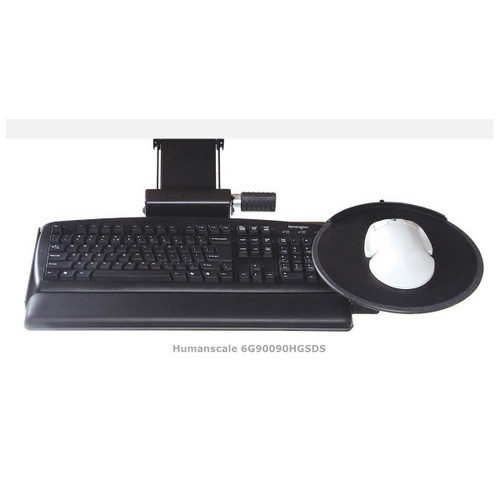
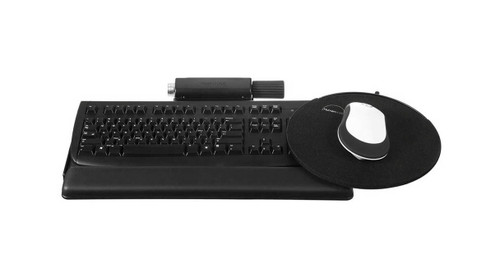
Humanscale 900 Keyboard Tray Standard SystemsHumanscale 900 keyboard platforms are our most popular choice for users with a standard shape or split ergonomic (i.e. NOT "natural" or curved) keyboard. They give users the freedom of a clip mouse platform that can be positioned on either side of the tray for right-hand or left-hand use. The mouse platform tilts separately from the keyboard platform, so the mouse can rest on a flat surface to avoid sliding off even when the keyboard is tilted.
Read more on our blog!
See this product in action:
Check out our video review of the Humanscale Keyboard Tray Systems below.
Humanscale 6G, 5G and 2G mechanisms are a vital part of any keyboard tray system. They connect the keyboard platform to the track, and allow it to move back and forth and vertically, swivel, and tilt to fit your specific needs. They use a 22" track to easily slide out to a comfortable position for work or underneath the desk when not in use. The tracks are extremely stable and the durable steel construction allow sure keying and mousing. They are set to allow adjustability within a safe operating range.
The difference between the 5G and the 2G is the tilt mechanism. The 2G is the older of the two mechanisms. It tilts by way of loosening the knob, raising or lowering the platform into place and then tightening the knob again to lock it. It also does not list the degree of tilt the platform is adjusted to for reference. We tend to recommend the 5G or 6G for most users. Both of the newer mechanisms tilt with a "dial-a-tilt" knob, allowing the user to adjust the pitch with an easy twist of a knob.
The 6G mechanism is Humanscale's newest offering. It features the same dial-a-tilt adjustment as the 5G with the added benefits of being slimmer and lighter. This gives maximum knee clearance, minimizes the amount of resources needed to manufacture it and gives it a sleeker appearance.


The clip mouse is the only mouse platform that adjusts in three dimensions to enhance comfort. It can be custom positioned using the height, depth, lateral, and tilt adjustability. Place it on either side of the keyboard for right- or left-handed use. Choose between 8.5" and 10" diameters to fit your workspace.
This Goldtouch Ambidextrous Mouse is a great universal mouse that's designed to fit both right-handed and left-handed users and relieve tension and strain. Purchase this item and receive a Goldtouch Ergonomic Mouse, absolutely free!

A keyboard tray is a key component of an ergonomic workstation. Position your keyboard tray so you can type and mouse while keeping your wrists straight. The ideal height for the keyboard is at elbow height or lower. Typically you should locate the keyboard tray just above your lap height. Your upper arms should hang comfortably at your sides as you work. The keyboard tray should be gently sloped or tilted away from the user to allow the wrists to be straight instead of flexed. When properly adjusted, a keyboard tray allows the back, neck, shoulders, and wrists to relax. The size of the keyboard tray must accommodate the keyboard and any input device like a mouse. Avoid having your keyboard on a tray and your mouse on the desk.
|
|