

The Evoluent Mouse Friendly Keyboard has been discontinued. For a similar product, please visit our sister site UPLIFTDesk.com and view the Ergonomic Mouse + Keyboard page.
Evoluent Mouse Friendly Keyboard
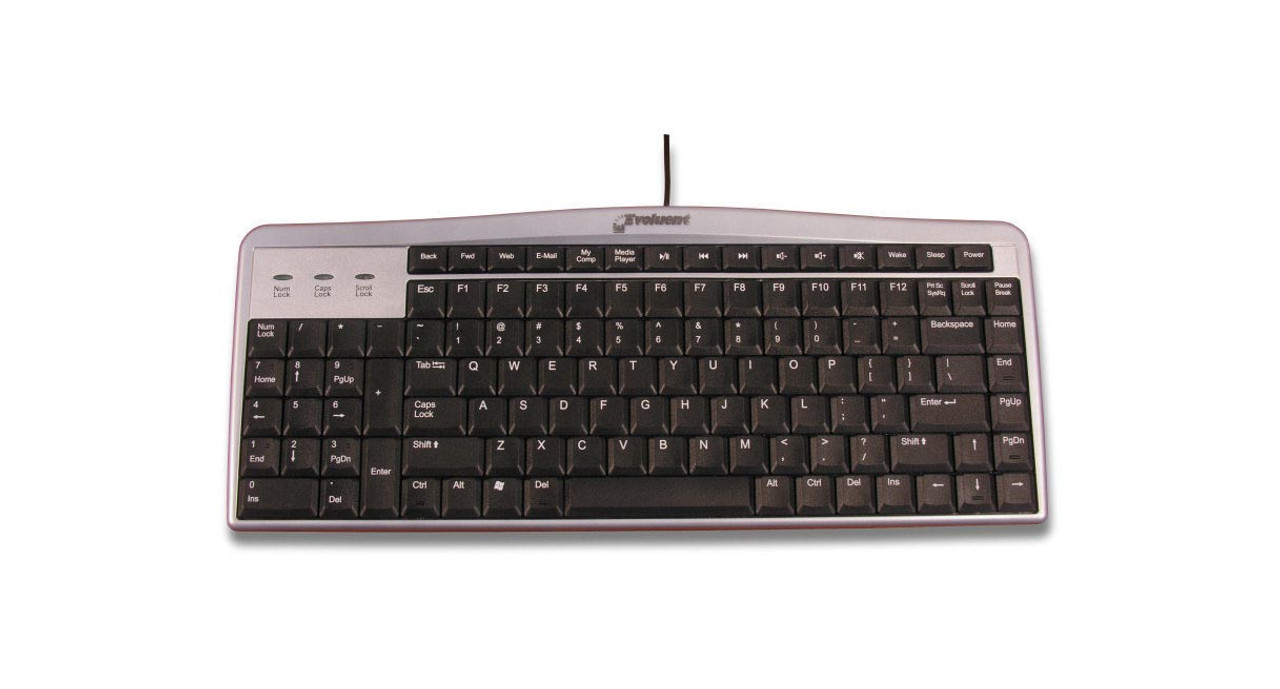
Designed to support a majority of typers, the Evoluent Mouse Friendly Keyboard moves the numeric keypad over a few inches to the left, allowing users to mouse in the correct ergonomic postures for them.
If you're wondering how exactly a keyboard can be "mouse friendly," you're not alone. Most keyboards feature a standard layout with lettered keys on the left and numeric keys on the right. Yet, this layout puts the user in an awkward position, quite literally. Traditional but not ideal, most standard keyboards force users to mouse with their arm at an angle. Until now.
Refreshed and updated, the Evoluent Mouse Friendly Keyboard assists you in navigating your desktop computer with increased efficiency and comfort, two things that lead to much happier and healthier workdays. Since most users will rarely access their number keys, they are put in their appropriate place, which gives you more freedom to mouse how you want.
Reduce stretching and work in your Neutral Reach Zone in more natural postures for your body with the revolutionary and ergonomic Mouse Friendly Keyboard by Evoluent.
Keyboard Features
- Greatly reduces stretching diagonally when mousing by moving the keyboard's numeric keypad to the left
- Simplifies computer navigation by allowing your left hand to access Enter, Del, Page Up, Page Down, arrows, and other keys in the numeric keypad on the left
- Features full-sized arrows, Del, Fn, Ctrl, Alt, Page Up, Page Down, Home, and End keys for easy typing
- Tactile bumps on popular keys such as Ctrl, Del, Home, Page Down, and the down arrow
- Duplicate Page Up, Page Down, Home, End, Del, and arrow keys on the right
- Extra Del key at the left end of the space bar allows for left-hand operation
- Hot keys allow for one-touch access to the Internet, e-mail, media player, volume control, standby, and power off
- High quality scissor key mechanisms with smart action and no key cap wobble
- Only 0.5” (1.3 cm) thick overall with ultra flat key caps
- Wired USB
- Compatible with Windows, Unix, Linux, and others that recognize the Num Lock key; This model is not compatible with Mac
- The top row of shortcut keys only work in Windows. No driver download necessary
Specifications
| Connectivity | Wired USB |
| Dimensions | 15.4" W x 6.25" D x 0.5" H |
| Weight | 2.2 lbs (1,000 g) |
| Number of Keys | 104 |
| Keyswitch | Scissor-switch membrane |
| Compatibility | Full functionality: Windows XP, Win 7 Basic functionality: Windows, Unix, Linux and others that recognize the Num Lock key (the top row of shortcut keys only work in Windows) Not compatible with Mac |
| Interface | USB (cannot be used with a USB to PS/2 adapter) |
| Warranty | 1 year |
This product comes standard with a 1-year warranty.
Return Information
- Return windows close 30 days after you receive your item.
- You are responsible for obtaining a Return Merchandise Authorization, the cost of shipping, and potential restocking fees, if the item has been opened.
- To start a return, or to view the full returns policy, click here.


