1-800-531-3746 8:00am-6:00pm Monday thru Friday CST
View Cart
Font Size: A A A
Introducing the UpLift 900 Standing Desk! 5% OFF Almost Everything in the Store! Amazing Prices on UpLift Sit to Stand Desks! View Our Beautiful Texas Native Wood Desks
Home Ergonomic Gift Ideas Contour RollerMouse Free2

Contour RollerMouse Free2

Send Page to Friend

Contour RollerMouse Free2

Our in-house Certified Professional Ergonomist is recommending the improved Mousetrapper Advanced Mouse instead of the Rollermouse. We no longer sell the Contour RollerMouse Free2 or Rollermouse Pro from Contour Designs. Please see our Contour Rollermouse and Mousetrapper review . We have found that the Mousetrapper offers a number of improvements over the Rollermouse Pro and RollerMouse Free2. Some users will obviously prefer the Rollermouse over the Mousetrapper and thus we are listing the features here. Try them both and let us know what you think.

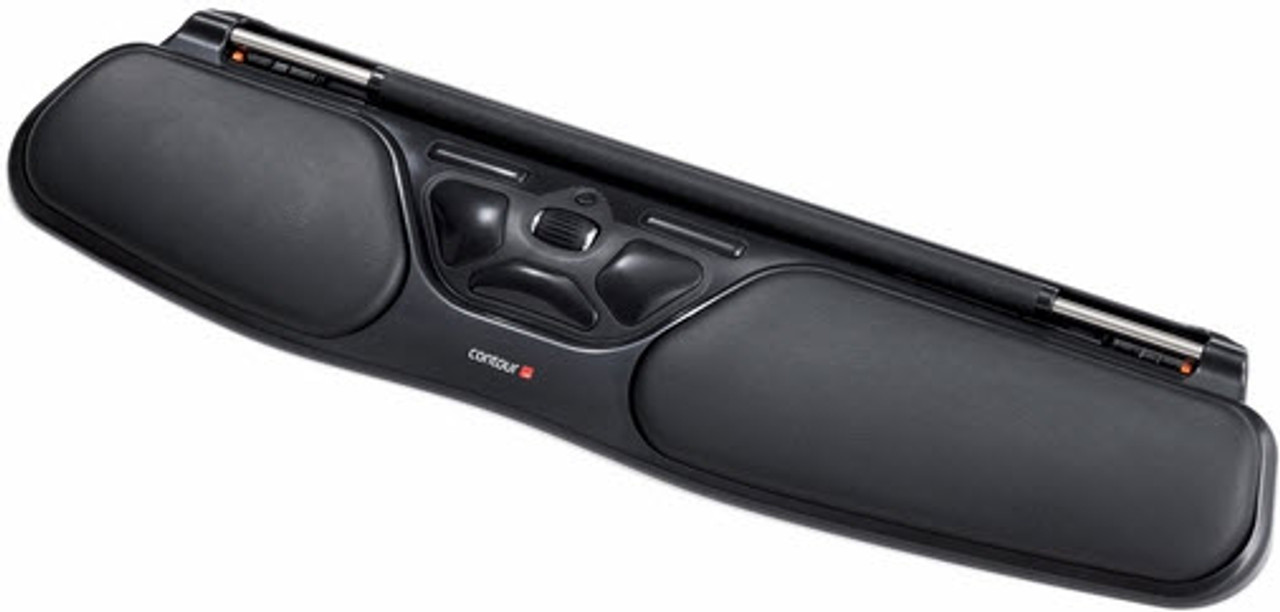
The RollerMouse Free2 ergonomic mouse has a wider bar than the Rollermouse Pro and also has removable palm rests. The RollerMouse Free2 has a slimer profile as well. Scroll down for more Contour Rollermouse Free2 details and specifications.


Healthy neutral zone for typing and mousing

Similar to the Mousetrapper design, the Contour RollerMouse Free2 sits directly in front of your keyboard. This ergonomic mouse allows you to work directly in front of you within the "neutral" posture zone. Staying in your neutral zone eliminates the need to reach to either side and keeps your elbows comfortably by your side. Repetitive reaching can lead to tightness and pain in the upper back, neck, shoulders and elbow areas.

Also similar to the Mousetrapper, the Rollermouse Free2 is manipulated with the use of an unflexed hand, eliminating the need to clutch or hold a device to control the cursor. Your fingertips roll the narrow bar up and down or side to side simultaneously. This unique design feature allows you to easily navigate the entire screen with very little friction or resistance. Eliminating the need to flex your fingers avoids activity through the carpal tunnel. You bypass the stress a traditional mouse causes the carpal tunnel that can create numbness, tingling and/or pain.

Stay flexible by using either hand or both. The centered mouse buttons encourage the use of either or both hands, reducing the risk of injury to your dominant mousing hand.

Contour RollerMouse Free2 Features

  • Like the Mousetrapper, the Rollermouse has several buttons that offer a variety of functions: The RollerMouse Free2 offers two easy options for left clicking - either push down on the navigation bar itself, or click the large left button in the button control area. Additional button functions include the traditional right click, a single touch double click button, a scroll wheel, a scroll lock, and copy and paste buttons.
  • Equal to the Mousetrapper and perfect for desktop or laptop computers: The RollerMouse Free2 fits snugly up against either your keyboard or laptop computer, and its slim, portable design fits into a laptop bag. Although we do recommend the Mousetrapper Flexible Mouse for laptop and travel use since it is wireless and smaller than the Rollermouse Pro and Free2. Rollermouse does not have a wireless function.
  • Gel palm rests: Opt to use the soft wrist rests for additional support or detach them if you have less space to work.
  • Plug and play compatibility: The Rollermouse Free2 is compatible with PC (XP and newer) and MAC OS; it hooks up to a computer with a USB connector.
  • Dimensions: 15" W x 3.5" D x 1.25" H

unflexed, zero tension operation

The rollermouse free is centered  in front of your keyboard or laptop

Ergonomists like the Free2 upgrade from the Contour RollerMouse for the following reasons:

- It works better with split keyboards because the length of the scroll bar is longer
- The more symmetric look and feel of the bar and buttons lends an increased perception of comfort and control
- Non-skid coating on the bar for better control
- Intuitive to use with left hand
- Less wrist deviation due to the longer bar, and narrower design reduces forward reach; this is significant for users with shorter arms
- This model is much easier to carry

Shop By Brand

Get the UpLift 900 electric sit-stand desk at a great price! Get healthy and move while working! -Ergonomic Office Assessment Tool - Ergonomist Approved Free Goldtouch mouse with purchase of our most popular chairs and desks!

Previously Viewed Items


Credit Card Processing

Confirmed for SquareGrove, HumanSolution, ErgonomicChairPro, Ergohuman.com, UPLiftDesk, FreedomChair is a BBB Accredited Business. Click for the BBB Business Review of this Office Furniture & Equipment in Austin TX
Our Customers Say ...
  • I received the chairs today and they are perfect. Thank you for your personal attention to my shipping snafu. In this day and age of the internet and push button instant gratification, we sometimes forget that the real value is not in a price that is 1% better. It's in the value added by empathetic people how really try to help. Maybe you should create a company tag line like "Real humans providing great human solutions."

    -Bruce Shapiro

The Human Solution � Ergonomic Chair, Keyboard Tray, Monitor Arm and More
2139 W Anderson Ln  |  Austin, Texas 78757  |  1-800-531-3746
we accept visa, mastercard, american express, discover, paypal